
Your Secure Hosting
  • 0 Shopping Cart
  • Home
  • Store
    • Browse All
    • Secure, Fast Shared Website Hosting
    • SSL Certificates
    • Secure, Flexible Cloud Hosting
    • Secure Linux Dedicated Server
    • Secure Linux VPS Hosting
    • Register a New Domain
    • Transfer Domains to Us
  • Announcements
  • Knowledgebase
  • Network Status
  • Contact Us
  • More
  • Account
    • Login
    • Register
    • Forgot Password?
  1. Home
  2. Knowledgebase
  3. WordPress
  4. How to Delete an Uncategorized Category in WordPress

  Categories

Backup/Restore
4
CloudLinux (cPanel)
10
cPanel - Control Panel
24
Databases
11
DirectAdmin
48
DNS - Nameservers
6
Domain Management
10
Email
17
FTP
9
Installing a Control Panel
6
Mail Filters & SPAM
8
Mobile
11
Others
3
PayPal
7
Plesk
47
Security
10
SiteWorx/InterWorx
58
Softaculous
69
SolusVM 1
18
SolusVM 2
16
SSL
5
Virtualizor
19
WHM
18
WordPress
17

  Categories

  Support

My Support Tickets
Announcements
Knowledgebase
Downloads
Network Status
Open Ticket

How to Delete an Uncategorized Category in WordPress Print

  • 0

You cannot remove the Uncategorized category, but you can rename it.


1. Log in to the WordPress dashboard.


2. From the Dashboard menu, go to Posts and click on Categories.
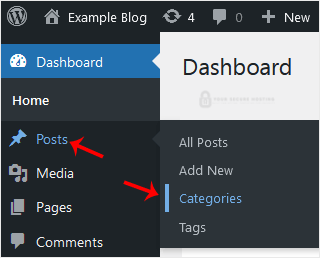
wp-dashboard-category-option.gif


3. Hover your mouse on the Uncategorized option and click on Quick Edit.
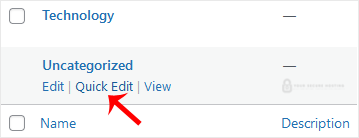
wp-uncategorized-category-remove.gif


4. Change its name and slug, and confirm with Update Category.
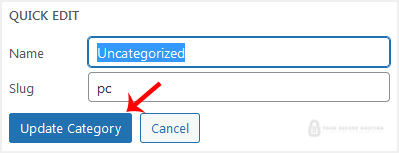
wp-uncategorized-category-update.gif

The Uncategorized category has been successfully renamed.


Was this answer helpful?

Related Articles

How to Access the WordPress Admin Dashboard WordPress is an easy to work with CMS software. To access a WordPress account, please follow... How to Remove Sample Comments and Posts From WordPress You get sample comments and posts in a fresh WordPress install. You can easily remove them in the... How to Write and Publish Your First Blog Post in WordPress Writing your first blog post is a fascinating thing. Follow the steps below to do so in... How to Remove a Post in WordPress You can remove the published or draft post in WordPress.1. Log in to the WordPress dashboard. 2.... How to Bulk Delete Posts in WordPress It is possible to delete posts in bulk using WordPress. You can also delete selected posts in...
« Back

  Support

My Support Tickets
Announcements
Knowledgebase
Downloads
Network Status
Open Ticket
Your Secure Hosting logo

Services

  • Home
  • Domain Names
  • Web Hosting
  • SSL Certificates
  • Business Email
  • Blog

Important Links

  • Knowledgebase
  • Network Status
  • Login To Your Account
  • Contact Us

Contact

  • (417) 812-6313
  • info@yoursecurehosting.com
© 2025 Your Secure Hosting. All Rights Reserved.

Loading...
Loading...

Generate Password

Please enter a number between 8 and 64 for the password length