Your Secure Hosting
  • 0 Shopping Cart
  • Home
  • Store
    • Browse All
    • Secure, Fast Shared Website Hosting
    • SSL Certificates
    • Secure, Flexible Cloud Hosting
    • Secure Linux Dedicated Server
    • Secure Linux VPS Hosting
    • Register a New Domain
    • Transfer Domains to Us
  • Announcements
  • Knowledgebase
  • Network Status
  • Contact Us
  • More
  • Account
    • Login
    • Register
    • Forgot Password?
  1. Home
  2. Knowledgebase
  3. SolusVM 1
  4. SolusVM 1 VPS Management
  5. How to Start/Boot Your VPS in SolusVM 1

  Categories

Backup/Restore
4
CloudLinux (cPanel)
10
cPanel - Control Panel
24
Databases
11
DirectAdmin
48
DNS - Nameservers
6
Domain Management
10
Email
17
FTP
9
Installing a Control Panel
6
Mail Filters & SPAM
8
Mobile
11
Others
3
PayPal
7
Plesk
47
Security
10
SiteWorx/InterWorx
58
Softaculous
69
SolusVM 1
18
SolusVM 2
16
SSL
5
Virtualizor
19
WHM
18
WordPress
17

  Categories

  Support

My Support Tickets
Announcements
Knowledgebase
Downloads
Network Status
Open Ticket

How to Start/Boot Your VPS in SolusVM 1 Print

  • 0

If your VPS is down/offline, you can start it using SolusVM 1.


1.
Log in to your SolusVM 1 Control Panel.

2. If you have multiple VPSs, select the appropriate one.
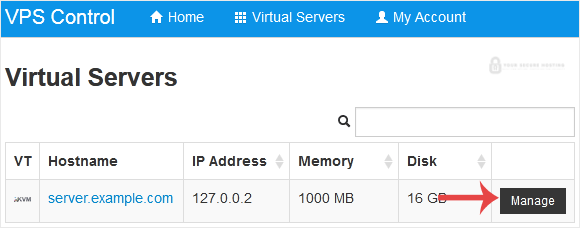
solusvm-select-vps.gif


3. Click on Boot.
solusvm-boot-start-vps.gif


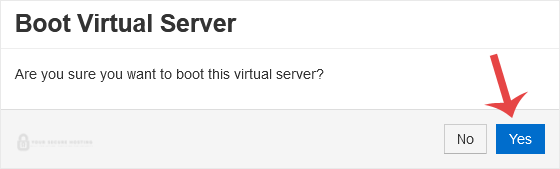
4. Click Yes to confirm.
solusvm-start-boot-confirmation.gif


It may take some time for the VPS to start.


Was this answer helpful?

Related Articles

How to Reboot/Restart VPS in SolusVM 1 You can restart VPS via the command line or SolusVM 1. How to Reboot/Restart a VPS via SolusVM... How to Forcefully or Gracefully Shut Down the VPS in SolusVM 1 You can shut down the VPS in two ways - forcefully or gracefully in SolusVM 1. How to... How to Access VPS via VNC in SolusVM 1 You can access your VPS via VNC in an emergency, such as when a firewall blocks your IP, the... How to Reinstall OS Using SolusVM 1 OS-Reinstaller You can easily Install/Reinstall the operating system using SolusVM 1. However, note that this... How to Enable Disable APIC, ACPI, VNC in SolusVM 1 SolusVM 1 allows you to enable or disable VNC, PAE, APIC, and ACPI.1. Log in to your SolusVM 1...
« Back

  Support

My Support Tickets
Announcements
Knowledgebase
Downloads
Network Status
Open Ticket
Your Secure Hosting logo

Services

  • Home
  • Domain Names
  • Web Hosting
  • SSL Certificates
  • Business Email
  • Blog

Important Links

  • Knowledgebase
  • Network Status
  • Login To Your Account
  • Contact Us

Contact

  • (417) 812-6313
  • info@yoursecurehosting.com
© 2025 Your Secure Hosting. All Rights Reserved.

Loading...
Loading...

Generate Password

Please enter a number between 8 and 64 for the password length