Your Secure Hosting
  • 0 Shopping Cart
  • Home
  • Store
    • Browse All
    • Secure, Fast Shared Website Hosting
    • SSL Certificates
    • Secure, Flexible Cloud Hosting
    • Secure Linux Dedicated Server
    • Secure Linux VPS Hosting
    • Register a New Domain
    • Transfer Domains to Us
  • Announcements
  • Knowledgebase
  • Network Status
  • Contact Us
  • More
  • Account
    • Login
    • Register
    • Forgot Password?
  1. Home
  2. Knowledgebase
  3. Plesk
  4. General (Plesk)
  5. How to Change the Password of a Plesk Account

  Categories

Backup/Restore
4
CloudLinux (cPanel)
10
cPanel - Control Panel
24
Databases
11
DirectAdmin
48
DNS - Nameservers
6
Domain Management
10
Email
17
FTP
9
Installing a Control Panel
6
Mail Filters & SPAM
8
Mobile
11
Others
3
PayPal
7
Plesk
47
Security
10
SiteWorx/InterWorx
58
Softaculous
69
SolusVM 1
18
SolusVM 2
16
SSL
5
Virtualizor
19
WHM
18
WordPress
17

  Categories

  Support

My Support Tickets
Announcements
Knowledgebase
Downloads
Network Status
Open Ticket

How to Change the Password of a Plesk Account Print

  • 0

Follow these steps to change your Plesk account password.

1. Log in to your Plesk account.

2. Click on Account from the Sidebar Menu.
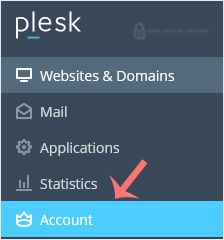
plesk-click-on-account-client.gif

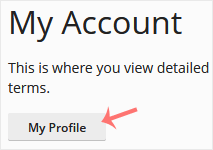
3. Click on My Profile.

plesk-myprofile-client.gif

4. In the password field, enter your password or click Generate to generate one.
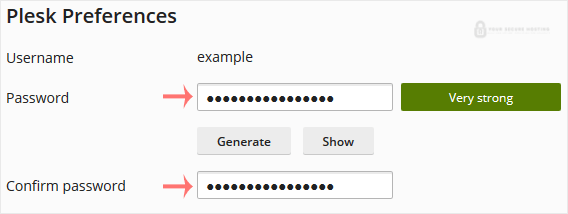
plesk-password-change-enter.gif

5. Click OK to confirm the changes.

You can now log in with the new password.


Was this answer helpful?

Related Articles

How to Edit a File in the Plesk File Manager Learn how to edit a file directly in the Plesk File Manager. This is useful for making quick... How to Log in to Plesk A tutorial on how to access the Plesk Control Panel. After you place an order and make a... How to Reset a Plesk's Account Password Follow these steps to reset your Plesk account password. 1. Open your Plesk login URL. 2.... How to Update a Plesk Account's Email Address Follow these steps to change your Plesk contact email address. 1. Log in to your Plesk... How to Change the Language of a Plesk Panel Follow these steps to change the language of the Plesk Panel. 1. Log in to your Plesk...
« Back

  Support

My Support Tickets
Announcements
Knowledgebase
Downloads
Network Status
Open Ticket
Your Secure Hosting logo

Services

  • Home
  • Domain Names
  • Web Hosting
  • SSL Certificates
  • Business Email
  • Blog

Important Links

  • Knowledgebase
  • Network Status
  • Login To Your Account
  • Contact Us

Contact

  • (417) 812-6313
  • info@yoursecurehosting.com
© 2025 Your Secure Hosting. All Rights Reserved.

Loading...
Loading...

Generate Password

Please enter a number between 8 and 64 for the password length